> ## Documentation Index
> Fetch the complete documentation index at: https://staging.docs.flowsign.app/llms.txt
> Use this file to discover all available pages before exploring further.
# Home
> Your account's landing page: activity stats, recent documents, document status, and an activity chart.
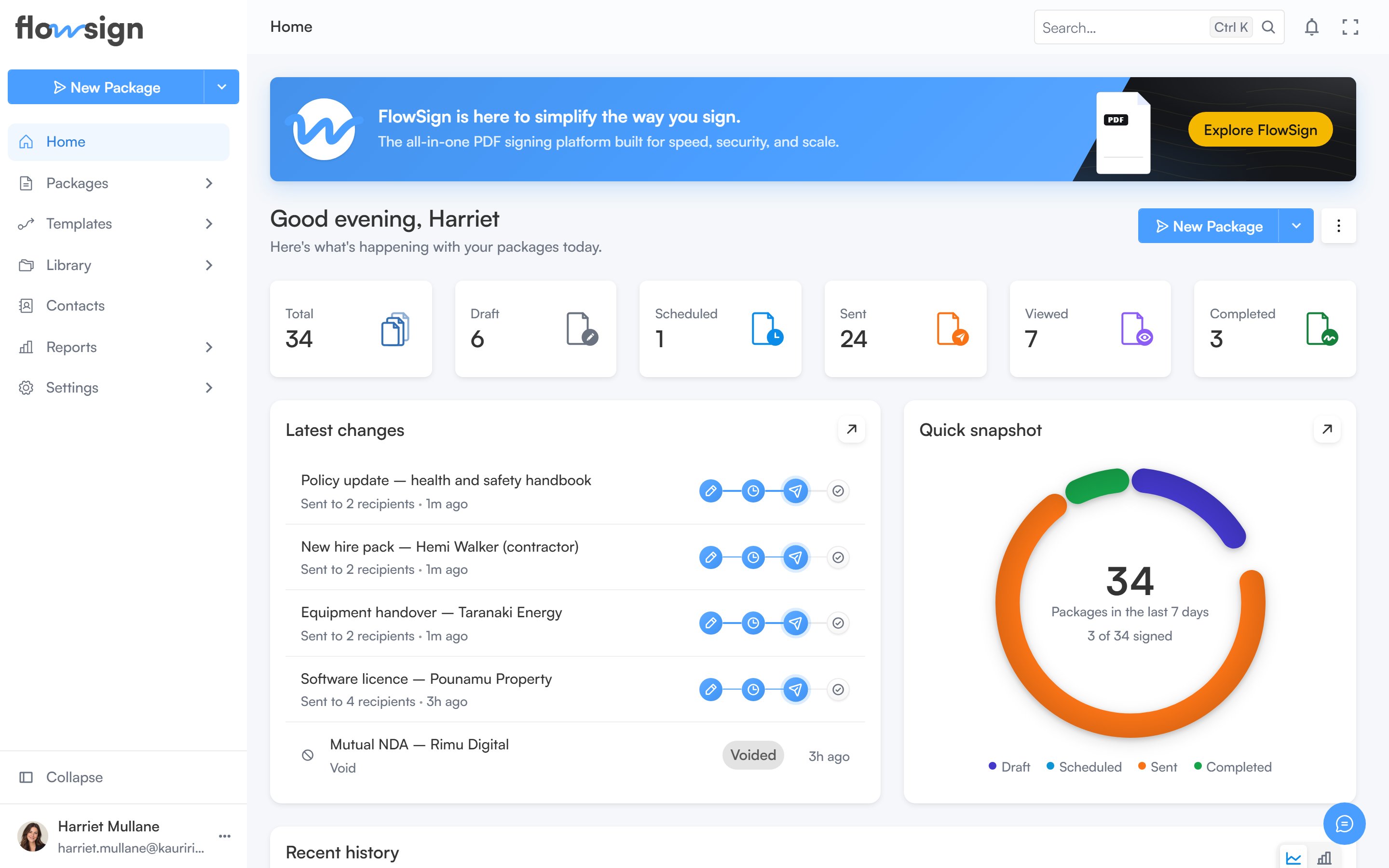
**Home** is the first page you land on after signing in. It summarises what is happening across your packages and gives you quick access to create a new one.
 ## Banner
A banner introduces FlowSign with an **Explore FlowSign** button that opens the product walkthrough dialog.
## Greeting row
Below the banner, a greeting shows your first name alongside two actions:
* The **Create** split button, which starts a new package. It only appears if your role has the `canSendPackages` permission.
* A kebab menu of dashboard options (see below).
## Dashboard options menu
The kebab menu next to the greeting has three panels:
* **Adjust layout**: switch the dashboard between **Default** and **Compact** density, and turn individual sections on or off: **Stats**, **Recent**, **Status** and **Activity**. When the Stats section is on, you can also choose which individual stat cards appear. A **Reset to default** button clears your customisations; **Done** closes the panel.
* **Date range**: choose one of the preset ranges, or **Custom range…** to pick specific dates. The chosen range applies to the stats, status card and activity chart.
* **Refresh data**: shows when the dashboard's data last synced, and a **Refresh now** button.
## Stats
A row of stat cards summarising your packages for the selected date range: total, draft, scheduled, sent, viewed, signed, rejected, on hold and expired. Each card links through to the packages list filtered to that status. Which cards show is controlled from **Adjust layout**.
## Latest changes and document status
Two cards side by side:
* **Latest changes**: your most recently updated packages, with a **View all** link through to **Packages**.
* **Document status**: a breakdown of your packages by status for the selected date range.
## Document activity
A chart of document activity over the selected date range, shown beneath the two cards above.
If every section is switched off in **Adjust layout**, the page shows an empty state: **Your dashboard is empty**, with a hint to reopen **Adjust layout**.
## Related
* [All Packages](/guides/packages/all-packages)
* [Create a package](/guides/packages/create-package)
* [Reports](/guides/reports/all-reports)
## Banner
A banner introduces FlowSign with an **Explore FlowSign** button that opens the product walkthrough dialog.
## Greeting row
Below the banner, a greeting shows your first name alongside two actions:
* The **Create** split button, which starts a new package. It only appears if your role has the `canSendPackages` permission.
* A kebab menu of dashboard options (see below).
## Dashboard options menu
The kebab menu next to the greeting has three panels:
* **Adjust layout**: switch the dashboard between **Default** and **Compact** density, and turn individual sections on or off: **Stats**, **Recent**, **Status** and **Activity**. When the Stats section is on, you can also choose which individual stat cards appear. A **Reset to default** button clears your customisations; **Done** closes the panel.
* **Date range**: choose one of the preset ranges, or **Custom range…** to pick specific dates. The chosen range applies to the stats, status card and activity chart.
* **Refresh data**: shows when the dashboard's data last synced, and a **Refresh now** button.
## Stats
A row of stat cards summarising your packages for the selected date range: total, draft, scheduled, sent, viewed, signed, rejected, on hold and expired. Each card links through to the packages list filtered to that status. Which cards show is controlled from **Adjust layout**.
## Latest changes and document status
Two cards side by side:
* **Latest changes**: your most recently updated packages, with a **View all** link through to **Packages**.
* **Document status**: a breakdown of your packages by status for the selected date range.
## Document activity
A chart of document activity over the selected date range, shown beneath the two cards above.
If every section is switched off in **Adjust layout**, the page shows an empty state: **Your dashboard is empty**, with a hint to reopen **Adjust layout**.
## Related
* [All Packages](/guides/packages/all-packages)
* [Create a package](/guides/packages/create-package)
* [Reports](/guides/reports/all-reports)