> ## Documentation Index
> Fetch the complete documentation index at: https://staging.docs.flowsign.app/llms.txt
> Use this file to discover all available pages before exploring further.
# New Package
> Build a one-off package from documents, recipients, security and an email message, then send or schedule it.
The package creator (**New Package**) builds a one-off document send. It also opens when you continue editing an existing draft.
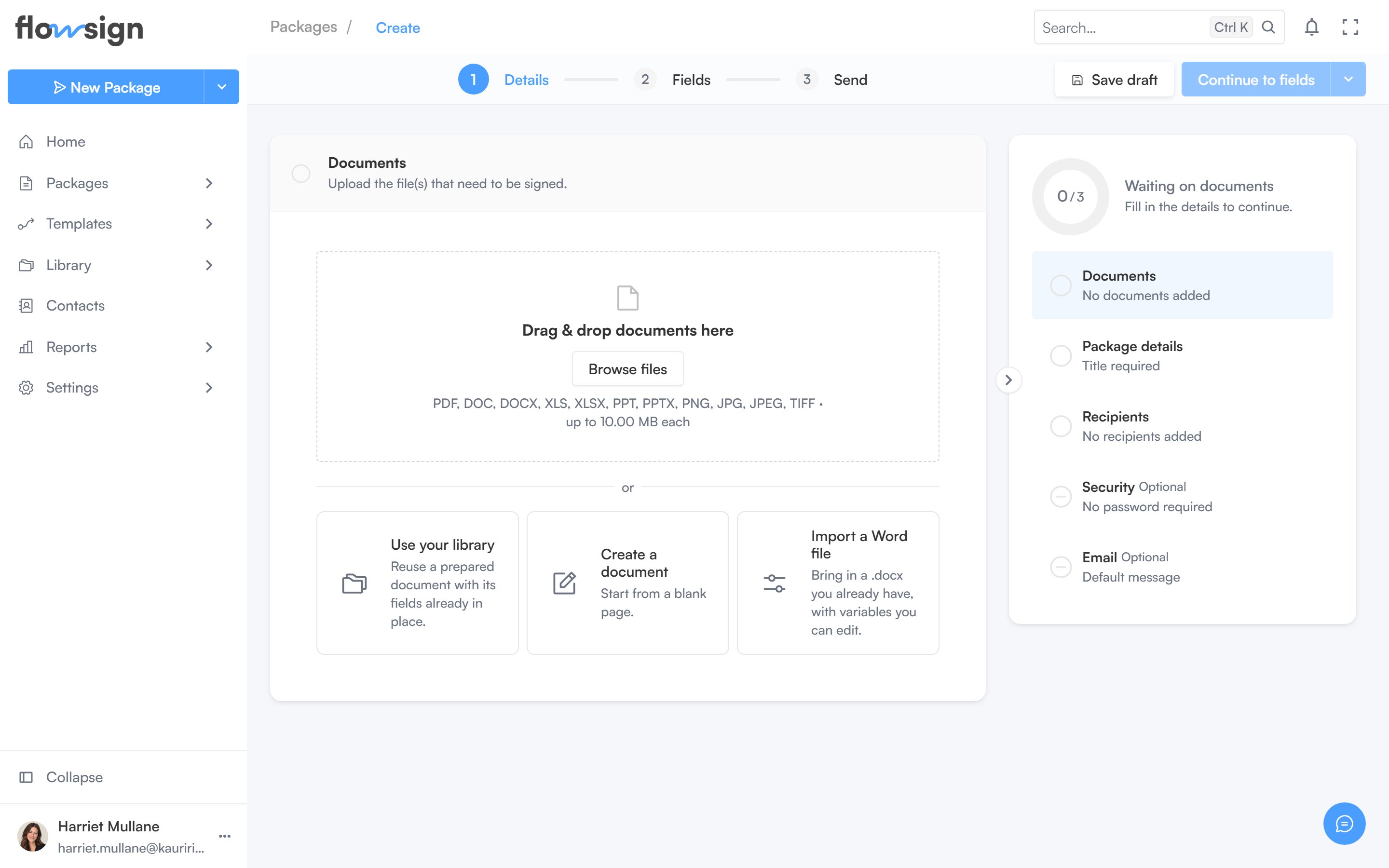 In **Documents** ("Upload the file(s) that need to be signed."), add files from your computer or, if enabled, from the [Library](/guides/library/all-files).
Give the package a **Package Title** (required), optional **Tags**, a **Duration** and an optional **Description**.
In **Recipients** ("Add the people who need to sign or receive this package."), add each person manually or switch to bulk mode to send the same package to a list from a CSV (requires a plan with the `bulkSend` gate: Enterprise). Turn on **Signing order** to make recipients act one after another instead of all at once.
In **Security**, turn on **Password protect signing** to require a password before recipients can view the documents. **Generate** creates a random password; **Copy** copies it.
In **Email**, set an **Email Subject** and **Message** (both optional; blank sends the default invitation) and a **Reminder Frequency**.
The top bar has **Save draft** and a **Continue to fields** button. Its menu offers **Send without fields**, **Activate package**, **Schedule send** and, where applicable, **Sign now** (in-person signing on the spot).
Recipient count is capped by your plan's signer limit; the limit is enforced when you try to add past it.
## Related
* [Fields editor](/guides/packages/fields-editor)
* [Package detail](/guides/packages/package-detail)
* [Building a workflow](/guides/building-a-workflow)
* [In-person signing](/guides/signing/in-person-signing)
In **Documents** ("Upload the file(s) that need to be signed."), add files from your computer or, if enabled, from the [Library](/guides/library/all-files).
Give the package a **Package Title** (required), optional **Tags**, a **Duration** and an optional **Description**.
In **Recipients** ("Add the people who need to sign or receive this package."), add each person manually or switch to bulk mode to send the same package to a list from a CSV (requires a plan with the `bulkSend` gate: Enterprise). Turn on **Signing order** to make recipients act one after another instead of all at once.
In **Security**, turn on **Password protect signing** to require a password before recipients can view the documents. **Generate** creates a random password; **Copy** copies it.
In **Email**, set an **Email Subject** and **Message** (both optional; blank sends the default invitation) and a **Reminder Frequency**.
The top bar has **Save draft** and a **Continue to fields** button. Its menu offers **Send without fields**, **Activate package**, **Schedule send** and, where applicable, **Sign now** (in-person signing on the spot).
Recipient count is capped by your plan's signer limit; the limit is enforced when you try to add past it.
## Related
* [Fields editor](/guides/packages/fields-editor)
* [Package detail](/guides/packages/package-detail)
* [Building a workflow](/guides/building-a-workflow)
* [In-person signing](/guides/signing/in-person-signing)