> ## Documentation Index
> Fetch the complete documentation index at: https://staging.docs.flowsign.app/llms.txt
> Use this file to discover all available pages before exploring further.
# Field editor
> Place signature, autofill and input fields on a package's documents and assign each to a signer.
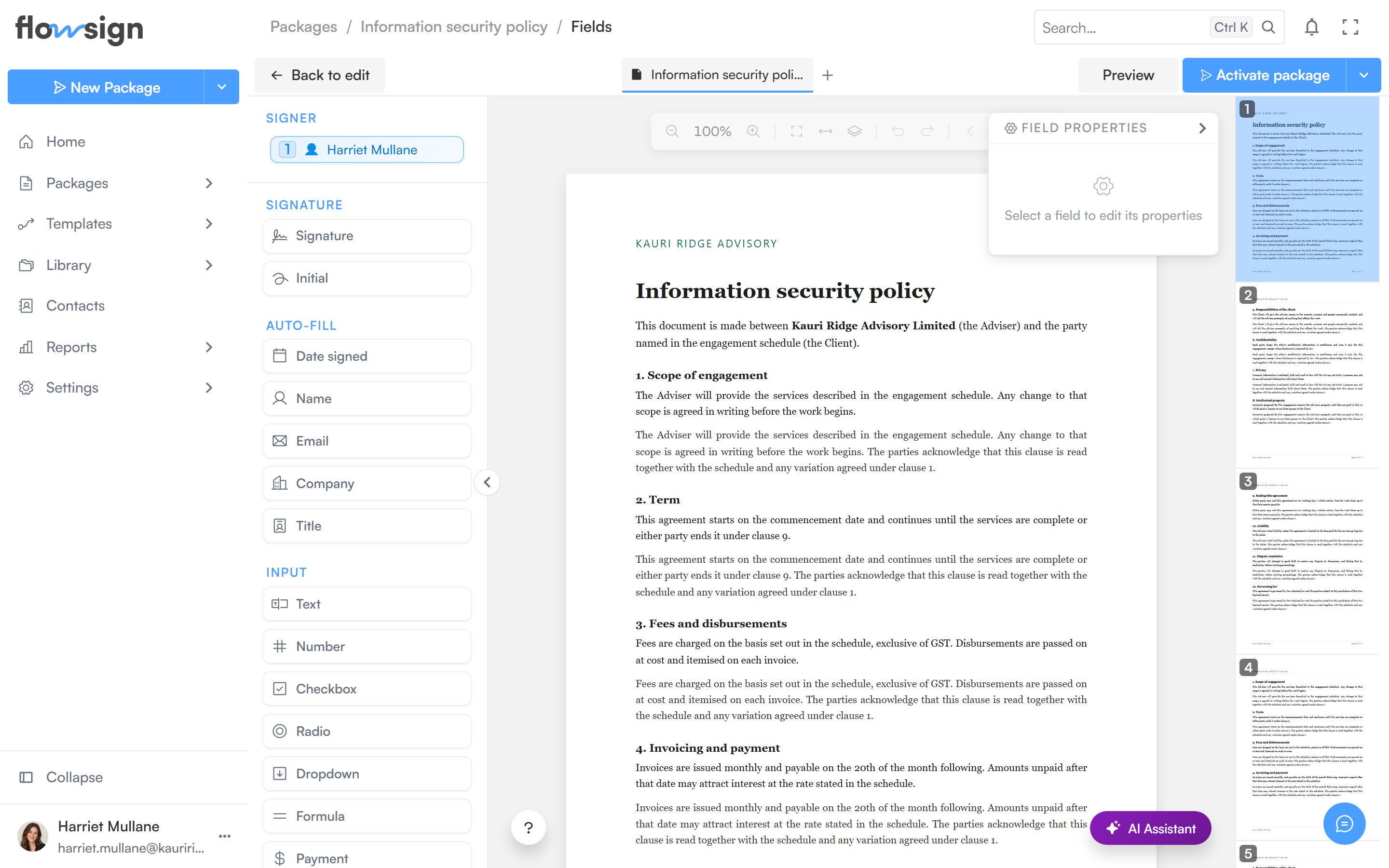
The field editor opens from a draft's **Continue to fields** button, or from a sent package's **Fields** tab. It shows your documents on a canvas with a field toolbar, a signer selector and a properties panel.
 ## Signer selector
Choose which recipient you are placing fields for. Each recipient's fields are colour-coded, so you can see at a glance who owns what across the document.
## Field toolbar
Drag a field type onto the page. Available types:
* **Signature fields**: **Signature**, **Initial**.
* **Autofill fields** (filled automatically from the recipient's details): **Date signed**, **Name**, **Email**, **Company**, **Title**.
* **Input fields**: **Text**, **Number**, **Checkbox**, **Radio**, **Dropdown**, **Comment**, **Formula**, **Payment**, **Label**, **Attachment**.
* **Action fields**: **Approve**, **Decline**.
Drag a placed field to move it, drag its handles to resize it, and select multiple fields with a marquee selection or Shift-click.
## Properties panel
With a field selected, the properties panel edits its settings, for example whether it is required and its label or format.
## AI assistant
A floating AI assistant can read the uploaded document and suggest field placement.
## Saving
A **Save** button persists your changes to the package draft. Unsaved changes are guarded: navigating away prompts you to save or discard first.
## Related
* [Create a package](/guides/packages/create-package)
* [Package detail](/guides/packages/package-detail)
* [Template fields](/guides/templates/template-fields)
## Signer selector
Choose which recipient you are placing fields for. Each recipient's fields are colour-coded, so you can see at a glance who owns what across the document.
## Field toolbar
Drag a field type onto the page. Available types:
* **Signature fields**: **Signature**, **Initial**.
* **Autofill fields** (filled automatically from the recipient's details): **Date signed**, **Name**, **Email**, **Company**, **Title**.
* **Input fields**: **Text**, **Number**, **Checkbox**, **Radio**, **Dropdown**, **Comment**, **Formula**, **Payment**, **Label**, **Attachment**.
* **Action fields**: **Approve**, **Decline**.
Drag a placed field to move it, drag its handles to resize it, and select multiple fields with a marquee selection or Shift-click.
## Properties panel
With a field selected, the properties panel edits its settings, for example whether it is required and its label or format.
## AI assistant
A floating AI assistant can read the uploaded document and suggest field placement.
## Saving
A **Save** button persists your changes to the package draft. Unsaved changes are guarded: navigating away prompts you to save or discard first.
## Related
* [Create a package](/guides/packages/create-package)
* [Package detail](/guides/packages/package-detail)
* [Template fields](/guides/templates/template-fields)