

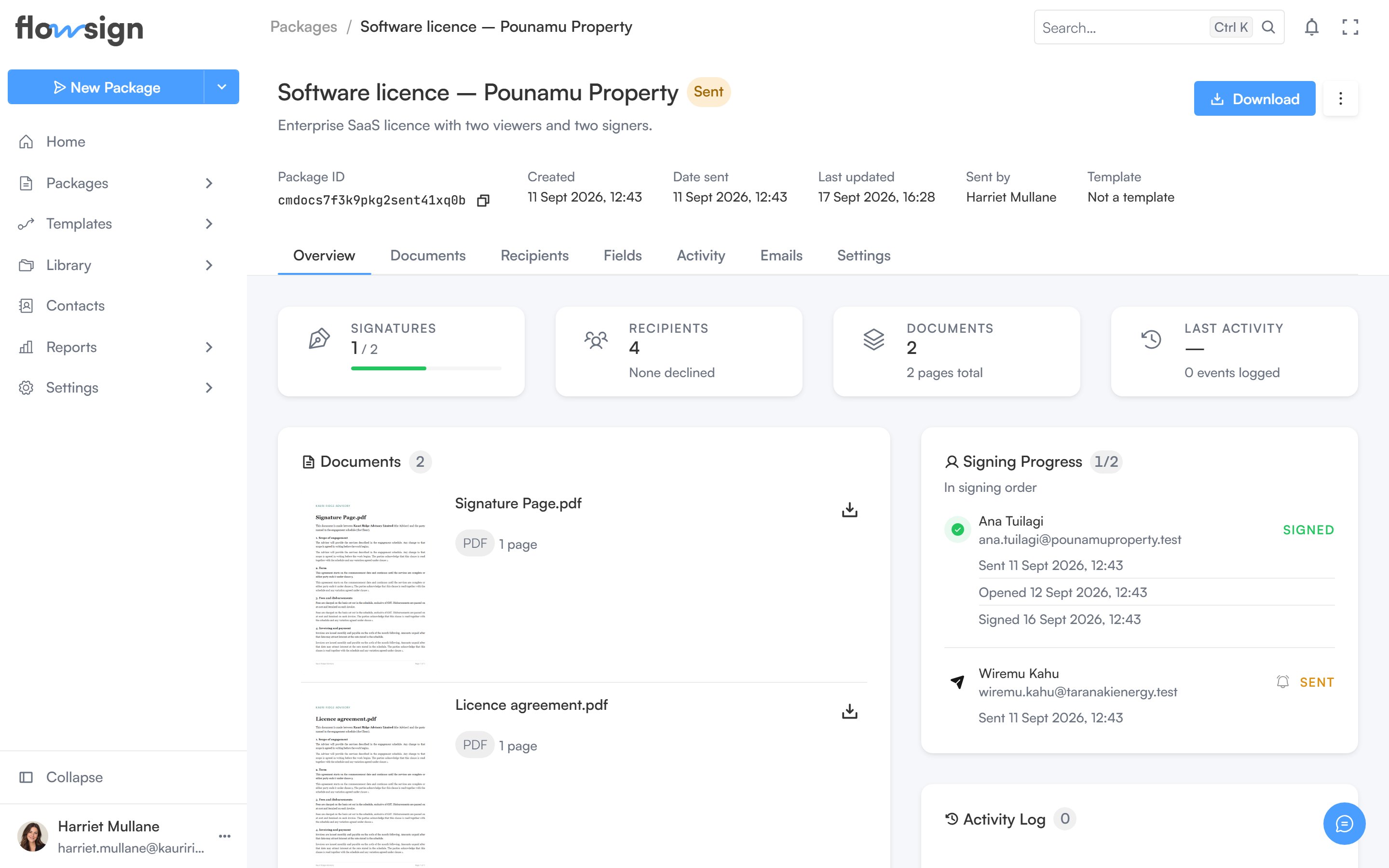
A sent package, with its recipients and activity timeline.
Header
The header shows the package title, its status tag (and a correction tag if it is mid-correction, linking back to the correction), description, and a meta strip: Package ID (with a copy button), Created, Date sent, Last updated, Sent by and Template. Actions on the right:- Download downloads the package’s files.
- An actions menu with, depending on status and permissions: edit, Sign in person, Send reminder, Duplicate, Delete, Download, Archive, Cancel scheduled send, and starting or discarding a correction.
Tabs
- Overview: stat tiles, the documents panel, a workflow journey panel (for workflow-based packages), the recipients/progress panel, and the latest 10 entries of the activity log with a View all link to the Activity tab.
- Documents: the package’s documents.
- Recipients: full recipient sessions and signing progress.
- Fields: an empty state, Field editor / “Place and edit fields for signers in the dedicated field editor”, with an Open field editor button that opens the fields editor.
- Activity: the full activity log.
- Emails: the email history for this package’s recipients.
- Settings: an empty state, Settings / “Per-package settings will live here.”
Corrections, in-person signing and cancelling a scheduled send are only offered when the package’s status and your permissions allow them.